
 Decoding the DNA of an eLearning Course: 5 Essential Instructional Elements">
Let's make a memory exercise and remember biology class. What is a cell? The cell is the basic unit of every living being whether human, animal or plant. We could say that the cell is the beginning of life.
Now, let's take this idea to eLearning. In this case, an eLearning course is a unit with connections, ideas and goals composed of teaching units, that is: cells. And what injects life into each of these cells is the instructional design because of this process depends the quality and quantity of meaningful learning experiences.
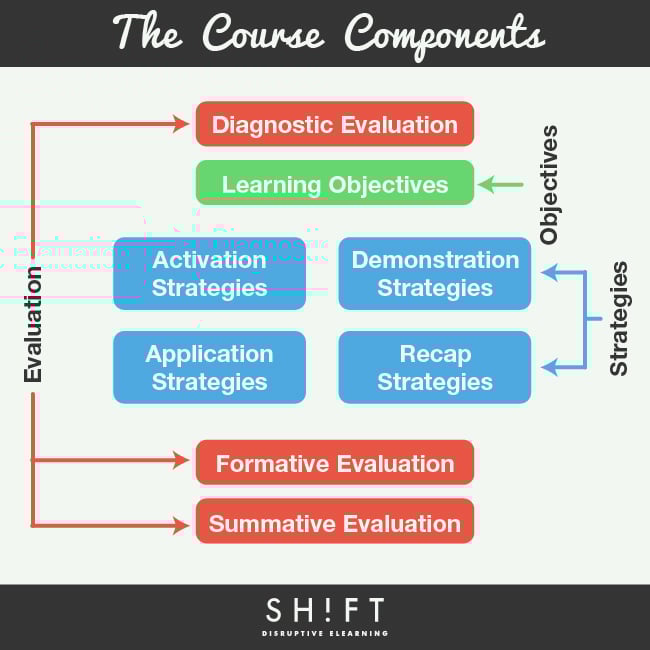
If you want to create an eLearning course, follow the example of the cell cycle, as each teaching unit is divided into a number of elements, indispensable for enabling learning. Within each one, there is the necessary DNA to build effective, coordinated and comprehensive didactic environments that completes the learning cycle. We will discuss each of its components in this post.
1) Diagnostic Evaluation.
Include a diagnostic evaluation at the beginning of the course. This will enable the learner to recognize or blend in prior knowledge they have about the main topic. You may present the evaluation as a test or by including a problem-based situation along with some questions.
2) Learning Objectives.
The learning objectives are the WHAT and WHY of the eLearning course; are the compass that directs the learning process. Once these are defined, you can plan for the contents, strategies and the evaluation forms. In other words, determining learning objectives will help you determine what to include (or exclude) in a course.
To write objectives effectively consider that they should describe the action that the learner will be able to perform at the end of the course, using an infinitive verb. Instead of describing the course content in the objectives, find ways to focus on what the students will be able to do, the tasks they must undertake and the tools they can use to deal with those tasks.
Example: After completing the course, students will be able to plan a teaching unit for an eLearning course.
3) Teaching and Learning Strategies.
If the objectives are the why and what of a course, the teaching-learning strategies define HOW we are going to deliver these objectives. It is recommended that eLearning courses include different types of strategies, for instance:
- Activation Strategies. It takes time to prepare students for a new set of information. Therefore, it is important to start each section by activating prior knowledge. Allow learners to connect previous experiences with that they’re currently learning.
Example: In a course on safety measures during an earthquake, you can use a video or a news story about a seismic event in the country and its consequences.
- Demonstration Strategies. So many eLearning courses are “tell tell tell”, and don’t really show learners what to do. For effective instruction, don’t just tell learners how to do it, prove them how it’s done. Illustrate the information to learn in a clear and simple way, and organized to facilitate understanding. Scenarios, system simulations and role playing scenarios are forms of discovery activities that help tangibly illustrate to students the information.
Example: In a course about pharmacy products, you can use a comparison table showing the differences between the characteristics of each product.
- Application Strategies. Demonstration and application works hand in hand. Show students how to apply new information is a good start. But you have to allow them to apply it on their own. Let them practice and learn from their mistakes.
Example: In a legal training course, you can include a case study with questions that allow learners to apply legal clauses to work situations.
- Recap Strategies. Finally, it is important to display the most relevant aspects of the topic just seen. Using summaries and knowledge checks are common recapitulation strategies, although schemes, concept maps and infographics can also be used.
4) Formative Evaluation.
Feedback is crucial in motivating learners and ensuring the efficiency of their learning process. When provided with feedback, learners usually try to correct mistakes and eliminate errors accordingly.
Note, however, that the best feedback is given immediately. It should also reinforce learning and sustain the learner's interest and motivation. The latter can be in a form of a simple explanation on why an answer is correct or incorrect.
5) Summative Evaluation.
Include a Summative Evaluation at the end of the course to quantitatively and qualitatively verify compliance with the learning objectives.
These components form the critical axis of the pedagogical architecture for eLearning. Using them creatively and wisely, can make the difference between an eLearning course that is a live or a random combination of words and media that do not achieve the expected cell development.
Further Resources:
Terminology Tuesday: Formative vs Summative Evaluation
Types of Assessment Questions Used in eLearning Courses

Ready to transform your corporate training?
See real results from companies that train with SHIFT — or talk to our team.